Desktop Workbench · Web & E-Commerce Media Batch Downloader

TuGet Desktop: Web Media Batch Downloader Client

Batch submit web and e-commerce URLs, inspect images, videos, and audio, then save on demand. Free trial available; license required for export.

Can't access the Microsoft Store?Download Standalone EXE Installer (64-bit)
Unlimited free trial; license required to download or copy media & links·Windows 10 / 11 64-bit Official Store Edition
PRO
TuGet Dedicated Website·Commercial licensing, dedicated release, and services
Visit tuget.yueding168.com
UI Showcase

Intuitive Desktop Interface for Batch Media Tasks

Structured around the actual running client, providing clear task queues, media preview cards, and organized local storage

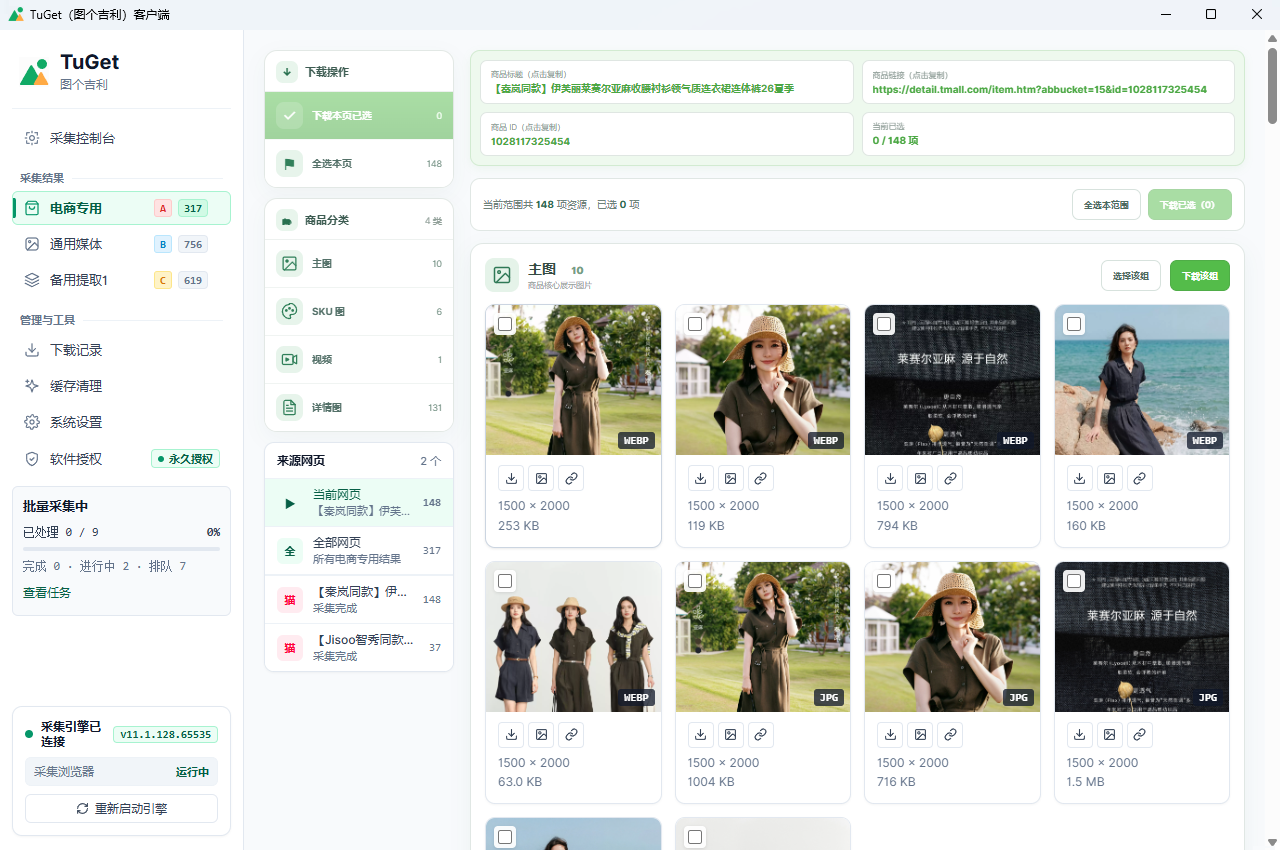
TuGet DesktopUI Preview
Client UI Language: Simplified Chinese
TuGet Desktop task panel and media preview interface screenshot
Click for 1:1 Full HD View
Main ViewMain Task Panel: Monitor extraction progress and inspect categorized media preview cards

Tailored for Three High-Frequency Media Tasks

Providing organized batch extraction for e-commerce materials, web video/audio, and dynamic single-page content

Scenario 1 · E-Commerce Materials
01

Batch Extraction for Product Gallery & Detail Images

Problem: Main photos, SKU color options, and detail graphics are scattered across long pages, making manual saving tedious and error-prone.
TuGet's Solution: Analyzes public marketplace page structures, categorizing gallery images, SKU variants, and detail sheets automatically.
Result: Receive an organized local folder of assets without right-clicking images individually.
Typical Assets: Main Gallery / SKU Variants / Detail Long Images / Product Videos
Scenario 2 · Web Video & Audio Archiving
02

Consolidated Media & Stream Extraction

Problem: Web media comes in diverse formats; standard browser saving often yields low-res thumbnails and fails to extract embedded audio or video.
TuGet's Solution: Provides a consolidated list of accessible images, background audio, MP4 videos, and segmented streams on authorized pages.
Result: Save full-fidelity media locally for research, reference, or creative archiving.
Typical Assets: Web Images / MP4 Videos / Background Audio / Public Streams
Scenario 3 · Dynamic Long Pages
03

Simulated Viewport Loading for Infinite Scroll

Problem: Feed communities and design platforms use lazy loading; unscrollable assets never trigger network requests.
TuGet's Solution: Simulates viewport scrolling to trigger asynchronous scripts, gathering dynamically loaded media automatically.
Result: Captures all accessible assets without missing deep page content.
Typical Assets: Waterfall Feeds / Dynamic News / Creative Inspiration Pages / Lazyload Assets

Comprehensive Coverage for Five Common Media Types

The client identifies and presents common media formats locally so you can inspect before saving

E-Commerce

Product Images

Main gallery carousel, SKU variant options, and detail long images

Graphics

Web Images

Hero banners, editorial illustrations, vector icons, and transparent PNGs

Video

Video Files

Embedded standard MP4, WebM, and product demonstration clips

Audio

Audio Files

Background tracks, sound effects, and public web audio assets

Stream

Streaming Media

Publicly delivered segmented web video and stream streams

Simple Four-Step Workflow

Aligned with actual client operations from URL submission to local folder organization

STEP 1

Prepare URLs

Copy links of the product or web pages you want to organize. Supports single paste or batch import.

STEP 2

Start Task

Choose fast or deep inspection mode. Tasks enter an organized queue processed in sequence.

STEP 3

Inspect & Verify

Client detects accessible media. If verification captchas appear, solve them in the interactive foreground window.

STEP 4

Select & Save

Inspect full preview cards and check the assets you need. Files save by default to the TuGet folder or your custom path.

Four Core Functional Modules

Built on real client capabilities to deliver an orderly, reliable local workflow

Extraction & Detection

Single URL paste or batch task import; fast and deep modes; automatic grouping into images, video, and audio.

Task Management

Clear progress indicators for queued tasks; pause, resume, and cancel controls; straightforward job monitoring.

Results & Inspection

Full-resolution media preview with no time limit; manual checkbox selection or one-click export to dedicated folders.

Settings & Cleanup

Configure custom destination directories; login session notices; clear local cache and history without deleting downloaded files.

Supported Environment & Usage Boundaries

Understand technical requirements, prerequisites, and compliance standards for an accurate user expectation

01

OS & UI Language

Supports 64-bit Windows 10 and 11. The current client software user interface is in Simplified Chinese.

02

Page Access & Login Prerequisites

Target pages must be normally accessible on your machine; specific member assets may require in-app login to display.

03

Technical Boundaries

Certain media may be unavailable due to site layout updates, dynamic captchas, geographical restrictions, or DRM encryption.

04

Compliance & Copyright

Intended strictly for organizing your own store assets, supplier-authorized materials, or legally permissible content. Does not grant third-party rights or bypass access controls.

Manual Right-Click Saving vs TuGet Desktop

An objective comparison between traditional browser saving and organized desktop extraction

Manual Browser Saving

Repetitive Manual Operations

  • Open product pages one by one and right-click 'Save Image As' repeatedly
  • Main images, SKU swatches, and detail graphics get dumped into a single cluttered folder
  • Must manually scroll down long pages waiting for lazyload images to load
  • Embedded videos and modern web formats are difficult to extract as usable files
Using TuGet Desktop

Organized Desktop Client Workflow

  • Paste batch URLs to queue tasks automatically without tab clutter
  • Assets are sorted into dedicated categories (main, SKU, detail, video)
  • Simulates viewport scrolling to capture dynamic content thoroughly
  • Extracts standard media files directly to your local drive for easy reference

TuGet Desktop Windows Official Release Information

Verified through Microsoft Store security sandboxing for easy installation and maintenance

Get TuGet from Microsoft Store

Recommended install channel managed by Windows app sandboxing, avoiding third-party installer prompts

Current VersionTuGet v1.2.2
Package FormatMSIX / EXE (64-bit)
System RequirementsWindows 10 / 11 64-bit
UI LanguageSimplified Chinese
Store Product ID9N5Q5LHZ5R8H
Publisher上海跃町网络科技有限公司

Frequently Asked Questions

Detailed answers regarding installation, unlimited trial limits, features, and activation keys.

TuGet Desktop can be installed and evaluated with no trial expiration date. Without activation, you can parse URLs and preview high-resolution images freely. Core actions such as downloading files and copying URLs require entering an activation key in the license dialog.

No. TuGet Desktop and DownPictures Desktop are independent applications with separate feature scopes and distinct licensing systems. Licenses are not interchangeable.

The browser extension runs inside your browser to quickly save visible images on the current page for occasional tasks. TuGet Desktop is a standalone application built for multi-URL queueing, infinite scroll rendering, and batch video/audio archiving.

Microsoft Store packages undergo cloud security audits and official digital signing, preventing SmartScreen security warnings and streamlining updates. An offline standalone EXE installer is also provided if Store access is unavailable.

TuGet Desktop provides specialized parsing for marketplaces including Taobao, Tmall, 1688, JD, PDD, and Amazon, while also extracting standard images, audio, MP4 video, and public streams from modern web pages.

TuGet supports interactive foreground windows. When a site triggers a slider verification or login check, a real browser window appears so you can solve it manually. Once passed, extraction continues automatically.

Files are saved by default to a TuGet folder inside your system's 'Downloads' directory, organized into subfolders per task. You can customize the storage destination in settings at any time.

TuGet Desktop currently supports 64-bit Windows 10 and Windows 11. The software client user interface is currently provided in Simplified Chinese.

Potential factors include: content requiring an authenticated account login, recent site layout changes, network connection errors to the host, or proprietary media encryption.

Microsoft Store users receive automatic updates managed by Windows. Standalone EXE users can revisit the website anytime to download the latest installer package.

No. Clearing history or cache within the app only removes local index records. Files already saved to your local storage drive remain completely untouched.

Start Organizing Web & E-Commerce Media Efficiently

Install TuGet Desktop from Microsoft Store with an unlimited free trial and streamline your media workflow

Unlimited free trial; license required to download or copy media & links
Need an offline installer?Download Standalone EXE (64-bit)